One small desk can serve two people at different times when both can set it up for their own work and leave it ready for the next turn. Agree when each person uses it, keep personal materials in separate real homes and include the adjustment and clearing steps in the handover. An empty desktop alone does not establish that the next person can work there.
Try the arrangement with the desk and suitable equipment you already have. Time-sharing solves a scheduling problem only if the work can happen at different times. If both people need the desk during the same meeting or study period, that conflict needs a separate plan.
Agree the Turns Before Arranging the Desktop
Compare the actual tasks and their timing. A fixed video meeting is different from paperwork that can move to another hour. Include time to finish, put materials away and let the next user adjust the setup. Do not reserve every minute for work and leave the handover to happen somehow.
For an illustrative day, Ana uses the desk from nine until noon and Ben from one until three. Those are example reservations, rather than an ideal work schedule. The useful feature is the nonoverlapping use and an agreed way to handle a late-running task.
Decide how changes are communicated. A simple shared note or calendar may be enough for the household. Establish what happens when a meeting overruns or someone needs an unplanned session, instead of leaving the next person to discover a full desk at their starting time.
Include the room's other uses. The desk may stay in a living room while someone else rests, talks or watches a screen. IKEA's small-office material presents work areas within rooms that serve other purposes. Reserving the desk does not automatically reserve the whole room or provide a private, quiet meeting space.
Check the Setup with Each Person Separately
Start with the first person's normal task and equipment. Position the chair, screen, keyboard and mouse using their applicable adjustment instructions. Check that the screen is in a useful position, the input devices are reachable, and the person's feet and back have appropriate support.
OSHA's workstation desk guidance addresses component placement, clear leg space and adjustment for the user. Apply those considerations separately to both people. A chair setting that suits Ana is not automatically Ben's starting position just because the chair fits under the desk.
Then repeat the trial with the second person. Include the actual documents, drawing pad or other equipment they use. A desk that holds a monitor and keyboard may not leave a suitable writing area for someone who works from paper.
If the available adjustments cannot accommodate one person, record the specific mismatch. Do not improvise unstable supports or alter the furniture to preserve the time-sharing idea. The arrangement needs an appropriate solution for both users before the desk becomes their regular shared workplace.
Separate Shared Equipment from Personal Kits
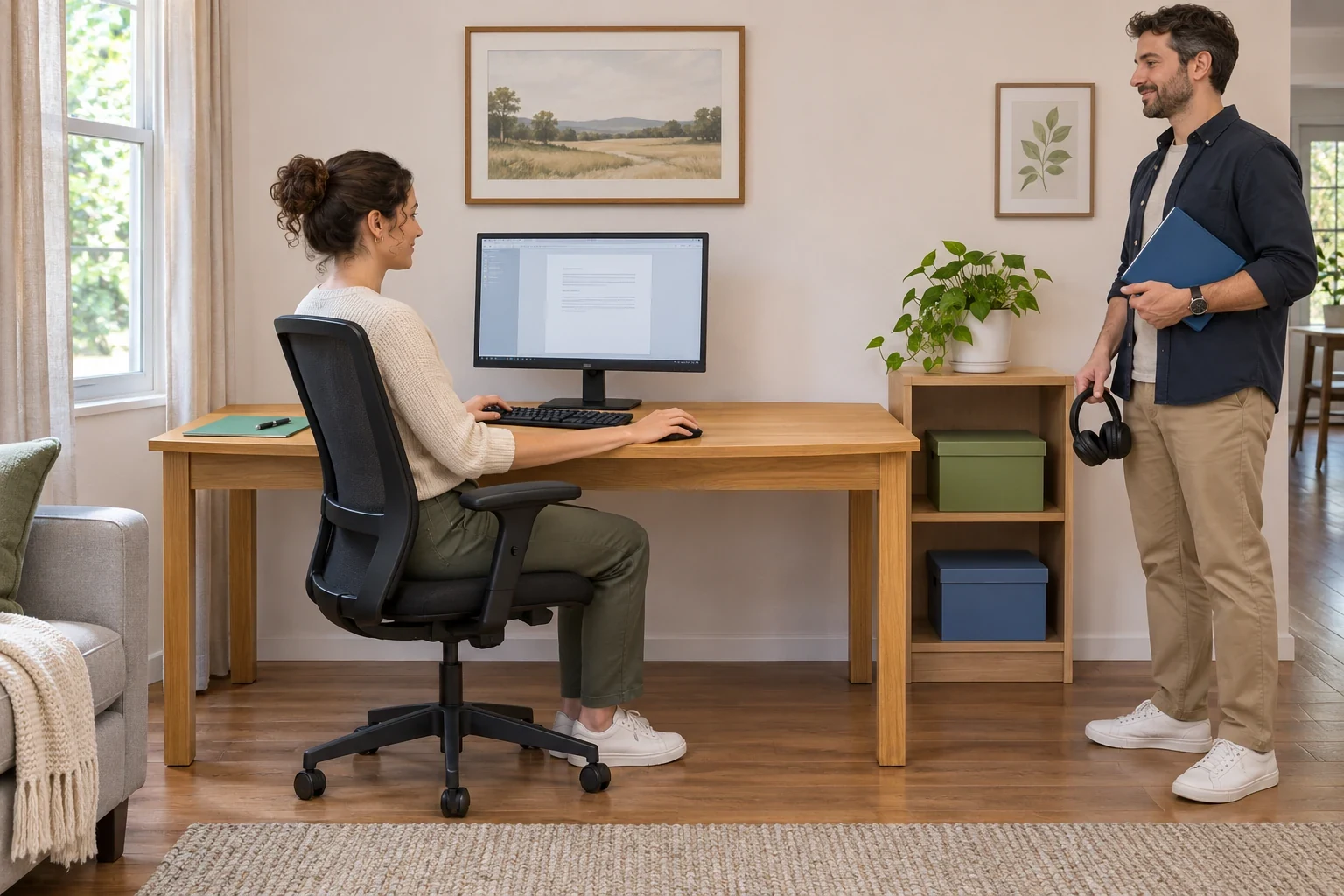
Choose what stays on the desk. In the example, the shared monitor, keyboard and mouse remain available. Ana brings a thin green folder and pen; Ben brings a blue notebook and headphones. Each kit is small because it contains the materials for that person's ordinary session, not every item they own.
Give the kits separate homes on an existing suitable nearby shelf. Ana's folder and pen return to her green box; Ben's notebook and headphones return to his blue box. The boxes must actually receive those objects and be accessible without blocking the desk or route. Use containers and locations appropriate for their contents.
IKEA's home-office guidance suggests choosing storage around what you need to keep. That distinction helps here: shared equipment needs a dependable working position, while personal materials need a dependable place between turns.
Keep bulky supplies, bags and boxes out of the leg space. If one kit cannot fit its intended home, resolve the contents or storage location before calling the desk ready. Moving everything from the desktop to the floor under the next user's feet is an unfinished handover.
Leave the Desk Ready for Adjustment
At the end of Ana's example session, she returns the green folder and pen to her own box. She handles any personal device and files according to the household's permissions and the device's instructions, then leaves the shared working area available. The monitor and input devices remain in the agreed shared arrangement.
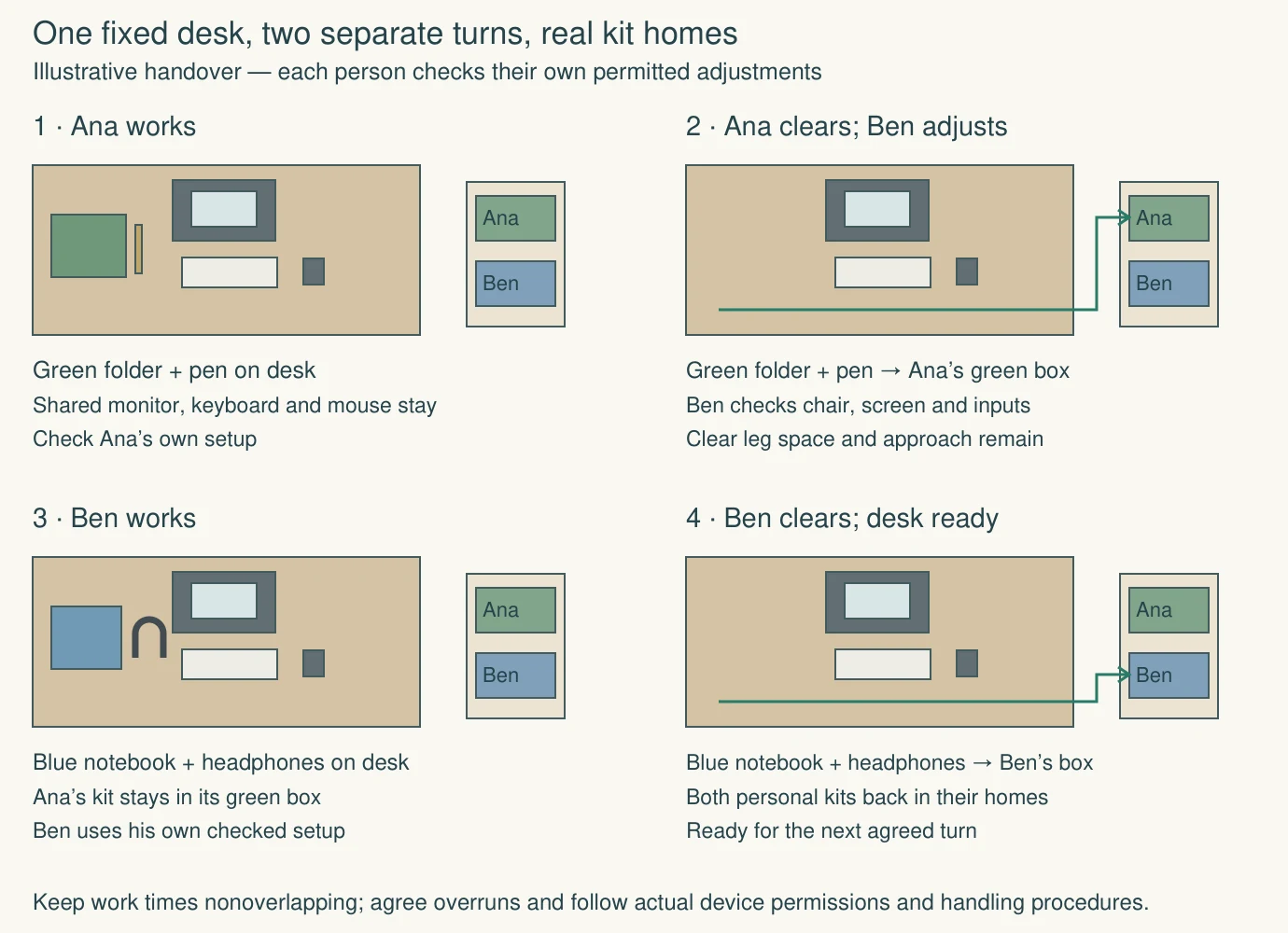
Ben then brings his blue notebook and headphones, checks his own chair and component positions, and begins his turn. At its end, those two objects return to his blue box. The cycle ends with both kits in their homes and the desk ready for the next scheduled user.
Record useful personal settings in a form the actual equipment supports, such as a note identifying the relevant chair adjustment and screen position. Treat those notes as starting points to check after sitting down, rather than universal fit measurements or permission to move a monitor beyond its limits.
Keep controls and adjustment mechanisms accessible. A storage box wedged beneath the chair lever or a cable pulled tight at the monitor's normal adjustment can make a nominally adjustable setup awkward to share. Follow the equipment instructions and keep the cable route clear of moving parts and the walking route.
Include Files, Permissions and the Next Session
Agree which equipment and supplies may be shared. Follow the appropriate account, locking, sign-out and file-handling procedures for the actual devices and work. Putting a notebook in a box is not a substitute for required confidentiality or access controls.
Use compatible connections and the specified power supplies for personal devices. Do not assume the next person's connector, charger or adapter is interchangeable because it looks similar. Keep any necessary personal accessories with their own kit and leave shared equipment as agreed.
After several normal turns, check what causes delays. The reservation may be too short, one person may need more writing area, or the supplies may be stored too far away. Adjust that specific part of the routine rather than buying another organizer to cover an unresolved conflict.
Keep the arrangement when both people can arrive, make their appropriate adjustments, work and return their materials without displacing the other person's belongings. The useful result is a desk that passes from one real user to the next, with enough time and space for both parts of the handover.